EDUCATION SOFTWARE & SCHOOL PLATFORMS

Connected schools.
More room for
learning.

School SaaS, role-based experiences and custom education software that bring admissions, staff workflows and family communication into clearer systems.

Product experience. School context. Deliberate access boundaries.

Illustrative teacher and students using digital tools in a school learning environment
THE CONNECTED SCHOOL DAY

Focused teams.
A shared purpose.

Illustrative education scene—not a client school or live product deployment.

EDUCATION ENGINEERING AT WEB CINCTURE

The whole school day.
Not another silo.

Web Cincture Private Limited develops education software and school SaaS platforms for admissions, attendance, family communication, administrative tools, role-based experiences and integrations. We work with organisations in Delhi NCR and beyond, defining the users, workflows and first useful scope together.

We also build and operate BharatCampus, our school operating system. Its product offering and a custom software engagement are distinct choices, with separate availability, onboarding and commercial terms.

Find the right platform approach

OUR EDUCATION PRODUCT

BharatCampus.
One connected school day.

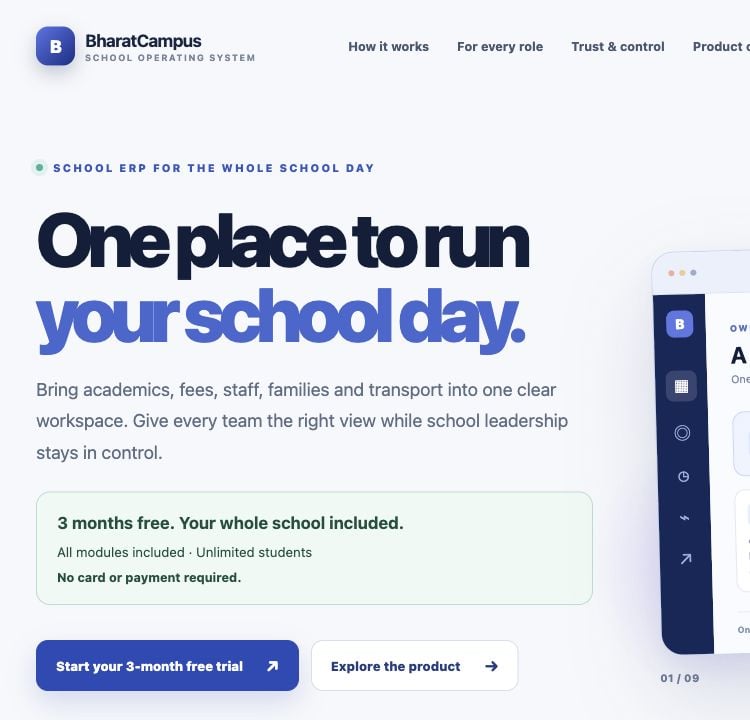
A Web Cincture-owned school operating system, bringing academics, fees, staff, families and transport into focused, role-governed workspaces.

Actual public website capture from 19 October 2026. Visit BharatCampus for the current experience, module availability and terms. Illustrative previews on its website are not live school records.

CUSTOM DEVELOPMENT CAPABILITIES

Build around the work.
Connect the community.

The capabilities below describe separately scoped custom development—not a promise that every feature is included in a BharatCampus plan.

01 / FIRST CONTACT

Admissions & enquiry workflows

Connect enquiry capture, application stages, document requests and authorised follow-up, with clear ownership of each next step.

Scope: journey stages · review queues · status communication
02 / THE SCHOOL DAY

Attendance & staff coordination

Design class, staff and daily task workflows around defined roles, relevant records and the exceptions that need attention.

Scope: staff views · attendance flows · task ownership
03 / FAMILY CONNECTION

Parent communication

Create notices, published updates and service requests for linked family accounts, using agreed channels and communication preferences.

Scope: family links · approved updates · channel integration
04 / ADMINISTRATION

Fees & administrative tools

Scope fee records, receipt workflows, staff administration and reporting. Payment integrations and reconciliation rules are agreed separately.

Scope: fee workflows · admin tools · review boundaries
05 / ACCESS & EXPERIENCE

Role-based web & mobile experiences

Build focused interfaces for school teams, teachers, students and parents. Define what each role can see and do across agreed platforms.

Scope: user journeys · platform coverage · permission model
06 / CONNECTED SYSTEMS

Integrations & operational reporting

Review existing data and vendor APIs before connecting records, communication services or other tools. Make data quality and reporting definitions explicit.

Scope: field mapping · integration checks · reporting events

Deliverables are confirmed in the proposal. Hosting, communication-provider usage, payment-provider charges and ongoing support are separate where applicable.

ONE PLATFORM, DISTINCT RESPONSIBILITIES

Connect the roles.
Keep the boundaries.

A shared platform should connect the school’s work without giving everyone the same dashboard or access to every record.

ILLUSTRATIVE SCHOOL OPERATING MODELRole examples—not live student information
01 / GOVERNANCE

School leadership

School-wide visibility and the approvals assigned to leadership.

02 / DAILY DELIVERY

Teachers & teams

Relevant classes, records and responsibilities for the assigned work.

THE SHARED FOUNDATIONSchool-scoped records.
Role-governed workflows.

Identity & permissions Defined actions Published information

03 / FAMILY ACCESS

Parents & guardians

Published information relevant to their linked child and school account.

04 / LEARNING ACCESS

Students

The learning information and school updates made available to their account.

Finance, administration and transport can have separate workspaces. School membership and access decisions must be enforced by the backend, not only by hiding interface elements.

A DAY WITH CLEARER HANDOFFS

From first contact
to the next school day.

Define the event, the team responsible and the information the next person actually needs.

  1. 01 / JOIN

    Enquiry & onboarding

    Move a request through the agreed admission and account-setup steps.

  2. 02 / COORDINATE

    Daily school work

    Support the attendance, staff and administrative actions included in scope.

  3. 03 / COMMUNICATE

    Relevant updates

    Publish approved information to the appropriate students and family accounts.

  4. 04 / REVIEW

    Open work & follow-up

    Give authorised teams visibility of exceptions and the next action.

Illustrative custom-platform workflow. It is not a guarantee of product modules, academic outcomes or automatic admissions decisions.

TRUST THROUGH ENGINEERING DETAIL

Your school’s context.
Deliberate access.

A useful education platform needs more than a list of modules. Identity, record ownership and the responsibilities around student information belong in the design.

DESIGN PRINCIPLE

School boundaries.
Focused permissions.
Accountable actions.

01

School & campus boundaries

Define each organisation’s records, memberships and cross-campus access. A shared database or platform must not imply shared visibility between unrelated schools.

02

Roles & family relationships

Map staff responsibilities and verified family-to-student links. Design server-side permission checks for viewing, changing, approving and exporting information.

03

Data handling & continuity

Agree the permitted fields, retention, hosting requirements, audit records and backup responsibilities. Review applicable privacy and consent requirements for the intended use.

04

Migration & integration checks

Assess source files, vendor APIs and data quality. Define mappings, validation, reconciliation and cutover steps before importing or connecting school information.

FROM REQUIREMENT TO SCHOOL READINESS

Design the workflow.
Enable the people.

Release planning includes data preparation, staff understanding and the support model—not just a software build.

  1. 01 / DISCOVER

    Understand the school

    Review roles, existing systems, workflows and the first useful requirement.

    Scope & workflow map
  2. 02 / DESIGN

    Make the work tangible

    Review the interface, permission model, data mapping and acceptance checks.

    Prototype & architecture plan
  3. 03 / VALIDATE

    Build & check the journeys

    Test scoped roles, imports, integrations and key tasks across agreed platforms.

    Test evidence & readiness review
  4. 04 / ENABLE

    Onboard with clarity

    Prepare documentation, staff walkthroughs, release and support handover.

    Runbook & ownership register

QUESTIONS, ANSWERED

Before the
first school workflow.

Practical answers about BharatCampus, custom development, data access and delivery.

Discuss your requirements
What education software can Web Cincture build?

Web Cincture develops school SaaS platforms, admissions and enquiry workflows, attendance and staff tools, parent communication, fee administration, role-based web and mobile experiences, integrations and operational reporting. The features, user roles and deliverables are agreed in each custom development scope.

How is custom school software different from BharatCampus?

BharatCampus is Web Cincture’s school operating system product, with its own available modules, onboarding and commercial terms. Custom development is a separately scoped engagement for requirements that need a new platform, workflow or integration. A capability listed on this page is not automatically included in a BharatCampus plan.

Can you build apps for parents, teachers and students?

Role-based web, Android and iOS experiences can be included in a custom project. The proposal defines the platforms, user journeys, permissions and connected backend tools. Product-specific availability for BharatCampus should be checked on its website or during a walkthrough.

Can the software support multiple schools and different staff roles?

A multi-school or multi-campus model can be designed when included in scope. School membership, staff roles and linked family accounts need explicit access rules enforced on the server. Sharing a platform does not mean that users from different schools or roles should see the same records.

Can existing school data and systems be connected?

Migration and integration begin with a review of source formats, record ownership, data quality, API access and vendor limits. The plan defines field mapping, validation, import checks and cutover responsibilities. Compatibility with every existing system or automatic migration is not assumed.

How are student information and parent access handled?

The design defines permitted data, role access, school boundaries, family-to-student links, retention and audit requirements with the school. Applicable privacy and consent requirements need specific review. Student records, identity documents and credentials should not be shared through the public enquiry form.

What determines cost, delivery time and support?

Cost and delivery time depend on the workflows, platforms, integrations, migration, testing and onboarding requirements. The proposal separates implementation, hosting, communication usage and ongoing support where applicable. Maintenance coverage, response windows and third-party responsibilities are documented rather than assumed.

Can AI be used in an education platform?

A scoped AI feature may assist with approved information, administrative drafts or routine workflow suggestions, with evaluation and human review. Automated admissions, grading, disciplinary decisions or sensitive student profiling are not implied by the services described here and require separate assessment and safeguards.


LET’S UNDERSTAND YOUR SCHOOL WORKFLOW

Your education ambition.
A clearer software path.

Tell us about the people, the daily work and the systems you use today. Please do not submit student records, identity documents or credentials through the enquiry form.