
Make booking clearer.
- Pickup, destination and booking request
- Vehicle options and agreed fare presentation
- Ride status, cancellation and support paths
- Scoped payment and notification flows
MOBILITY, CAB BOOKING & LOGISTICS SOFTWARE
Cab-booking apps, service platforms and dispatch tools—connecting customer requests, driver or partner workspaces and the backend behind every next step.
Android & iOS scope. Connected backend. Clear operating roles.
Illustrative route—not a real map, live vehicle location or estimated arrival time.
MOBILITY ENGINEERING AT WEB CINCTURE
Web Cincture Private Limited develops cab-booking platforms, customer and driver applications, service-booking workflows, dispatch tools, provider integrations and operational reporting. We work with teams in Delhi NCR and beyond, defining the apps, backend, operating rules and first useful release together.
We also build CAR24X7CARE, our roadside-assistance and car-service booking product. Its service model is distinct from custom cab-booking development. This page describes software engineering, not a taxi service or a guarantee of vehicle availability.
Scope the complete platformCUSTOM CAB-BOOKING SOFTWARE
Plan customer and driver applications, backend APIs and a dispatch/admin panel as a connected system. Android and iOS coverage is specified separately for each role.
OUR MOBILITY-SERVICE PRODUCT
Web Cincture’s roadside mechanic assistance and car-service booking product brings a different mobility context: coordinating a customer’s service need with operational action.
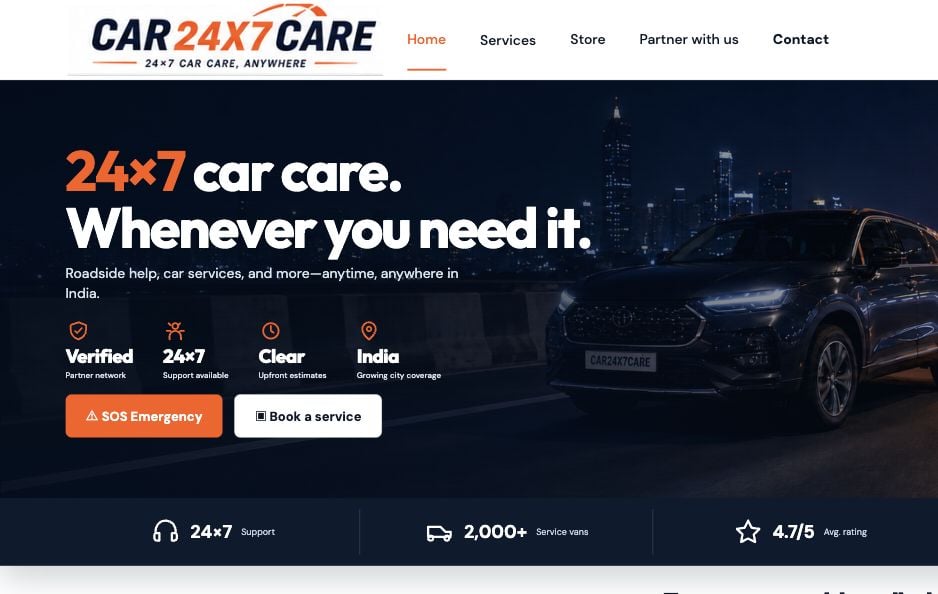
Customer service requests, roadside assistance and car-service booking.
Actual public website capture from 19 October 2026. CAR24X7CARE is not presented as a cab-booking product. Visit its website for current services and availability.
CUSTOM DEVELOPMENT CAPABILITIES
Build the workflows your service needs. The capabilities below are separately scoped development options, not a list of features included in CAR24X7CARE.
Connect rider requests, driver assignment, fare rules and trip states with the operating tools behind the service.
Scope: booking types · rider/driver roles · trip rulesDesign service discovery, requests, scheduling and partner coordination around the agreed assistance or service model.
Scope: service catalogue · job states · customer updatesGive authorised field teams relevant assignments, availability tools and job actions, with defined platform permissions.
Scope: assigned work · device access · action boundariesBuild work queues, assignment rules, reassignment and exception handling for the teams coordinating day-to-day delivery.
Scope: dispatch rules · service areas · intervention toolsAssess selected providers for location, routing, communication and payment workflows, including access, usage limits and failure paths.
Scope: APIs · permissions · event verificationScope vehicle and partner records, job history and operational reports. Data ownership and definitions are agreed before implementation.
Scope: records · reporting events · review accessA WORKFLOW, NOT JUST A MAP
A cab trip and a service job are different journeys. Each needs its own states, assignment rules and handling for the moments when the expected flow breaks.
Collect the agreed trip details and present the applicable booking terms.
Apply availability and assignment rules, with a path for rejection or no driver.
Record the permitted start, progress, cancellation and completion actions.
Handle the agreed payment status, records and unresolved support work.
Capture the agreed service and the information required for coordination.
Match or assign using the defined service-area and operating rules.
Keep authorised teams informed of acceptance, progress and exceptions.
Record the service outcome and identify any follow-up that remains.
No availability · Cancellation · Reassignment · Stale location · Weak network · Payment pending · Support review
Illustrative custom-platform workflows—not live operations, a promise of arrival time or a guarantee of service availability.
ONE PLATFORM, DISTINCT ROLES
Customer, driver/partner and operations interfaces connect through the backend. Access to jobs, locations and administrative actions is defined per role.
Only the booking, published information and actions permitted for that account.
Authentication, assignment, state transitions, data access and integration events.
Relevant job context and allowed actions—not unrestricted customer or operator data.
Dispatch, service-area controls and exception handling for authorised teams.
ENGINEER FOR REAL CONDITIONS
Location and network conditions change. Software should communicate uncertainty, preserve access boundaries and make failed actions reviewable.
Agree why location is needed, who may see it and how long it is retained. Display stale or unavailable updates; tracking depends on permissions, device behaviour and connectivity.
Define operator areas, partner eligibility and access to assigned jobs. Enforce the rules in the backend, not only through interface filters.
Review provider access, payment states, duplicate events, refunds and reconciliation where included. A booking submission or browser redirect is not proof of payment completion.
Document incident ownership, data recovery, support windows and third-party costs. Driver supply, operator permissions, safety processes and emergency response are not established by a software release.
FROM SERVICE MODEL TO RELEASE
Start with a bounded first release. Review the full customer, field-team and operating flow before expanding booking types or regions.
Agree users, booking types, service areas, operating rules and provider dependencies.
Scope & journey mapReview app screens, backend states, assignment logic and administrative controls.
Prototype & architecture planCheck roles, cancellations, network failures, location states and provider events.
Device tests & acceptance evidencePrepare the agreed app builds, store submission support, documentation and walkthrough.
Release checklist & support planQUESTIONS, ANSWERED
Practical answers about cab apps, driver tools, location, integrations and project scope.
Discuss your requirementsYes. A custom cab-booking platform can be scoped with a rider app, driver app, backend APIs and an administrative or dispatch panel. Booking types, fare rules, assignment, trip states, cancellations and integrations are agreed before implementation. This is a software-development service, not a taxi service operated by Web Cincture.
Android and iOS support can be planned for the agreed customer and driver roles. The proposal specifies platform coverage, device permissions, background-location requirements, testing and store submission support. Approval and review timing are controlled by the respective app stores.
No. CAR24X7CARE is Web Cincture’s roadside-assistance and car-service booking product. It is shown as mobility-service context, not as a released cab-booking platform. Cab-booking development is a separately scoped custom software engagement.
These can be reviewed as separate requirements during discovery. Each booking type needs its own availability, pricing, cancellation, driver-assignment and operating rules. A capability mentioned on this page does not mean every booking type is included in the initial release.
Map and location features depend on the selected provider, user permission, device behaviour, network conditions and update frequency. The design should show stale or unavailable location and define any ETA as an estimate. Continuous tracking, precise arrival times or emergency response are not guaranteed.
Integrations are scoped after reviewing vendor APIs, account eligibility, permissions and test access. Payment status, duplicate events, failures, refunds and reconciliation need defined handling where included. Provider usage fees and production approvals are separate dependencies.
The project defines roles, assigned jobs, service areas and permitted records, with access checks enforced by the backend. Location visibility, retention and administrative actions are agreed with the operator. Driver documents and precise customer locations should not be submitted through the public enquiry form.
Cost and timeline depend on the apps, platforms, booking rules, integrations, testing and operating requirements. The proposal separates implementation, hosting, map usage, messaging, payment-provider fees and maintenance where applicable. Support coverage and handover are explicitly agreed; a software release does not establish licences, drivers or service availability.
LET’S CONNECT THE NEXT JOURNEY
Tell us about the service, the customer journey and the team coordinating it. Please do not submit driver documents, customer locations or credentials through the enquiry form.